Skip to content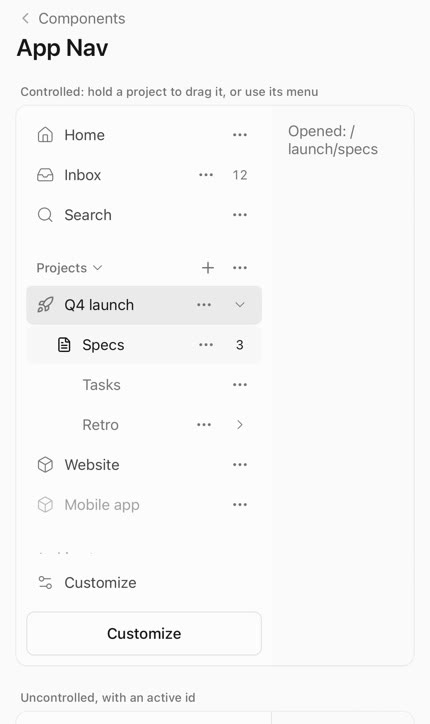
app-nav-example.tsx
Renders a navigation model into the Sidebar, with groups, badges, statuses, children, row actions, reordering, pinning and hiding.
Installation
Usage
import {
AppNav,
AppNavBottomBar,
AppNavCustomize,
type AppNavGroup,
type AppNavItem,
} from "@/components/ui/app-nav"
import { AppShell, AppShellMain } from "@/components/ui/app-shell"
import { Button } from "@/components/ui/button"
import {
Sidebar,
SidebarContent,
SidebarFooter,
SidebarInset,
SidebarProvider,
} from "@/components/ui/sidebar"
import { Text } from "@/components/ui/text"<Frame>
<SidebarProvider isMobile={false}>
<Sidebar collapsible="none">
<SidebarContent>
<AppNav
groups={GROUPS}
pathname={pathname}
onNavigate={navigate}
preferences={preferences}
onPreferencesChange={setPreferences}
customizable
pinnedLabel="Pinned"
/>
</SidebarContent>
<SidebarFooter>
<AppNavCustomize
groups={GROUPS}
preferences={preferences}
onPreferencesChange={setPreferences}
label="Customize"
title="Customize sidebar"
description="Choose what shows, and hold a grip to drag rows."
/>
<AppNavCustomize
groups={GROUPS}
preferences={preferences}
onPreferencesChange={setPreferences}
>
<Button variant="outline" />
</AppNavCustomize>
</SidebarFooter>
</Sidebar>
<Status item={pathname} />
</SidebarProvider>
</Frame>Composition
AppNavAppNavActionAppNavBottomBarAppNavCustomizeAppNavGroupAppNavIconAppNavItemAppNavRenderLink
Examples
import * as React from "react"
import {
ArchiveIcon,
BoxIcon,
CopyIcon,
FileTextIcon,
HomeIcon,
InboxIcon,
PlusIcon,
RocketIcon,
SearchIcon,
TrashIcon,
} from "@fabricator-ui/icons-react-native"
import { View } from "react-native"
import { SafeAreaInsetsContext } from "react-native-safe-area-context"
import {
EMPTY_NAV_PREFERENCES,
type NavPreferences,
} from "@/registry/fabricator/shared/lib/app-shell-model"
import {
AppNav,
AppNavBottomBar,
AppNavCustomize,
type AppNavGroup,
type AppNavItem,
} from "@/components/ui/app-nav"
import { AppShell, AppShellMain } from "@/components/ui/app-shell"
import { Button } from "@/components/ui/button"
import {
Sidebar,
SidebarContent,
SidebarFooter,
SidebarInset,
SidebarProvider,
} from "@/components/ui/sidebar"
import { Text } from "@/components/ui/text"
const NO_INSETS = { top: 0, right: 0, bottom: 0, left: 0 }
const actions = (name: string) => [
{ id: "duplicate", label: "Duplicate", icon: CopyIcon, onSelect: () => {} },
{ id: "archive", label: "Archive", icon: ArchiveIcon, onSelect: () => {} },
{
id: "delete",
label: `Delete ${name}`,
icon: TrashIcon,
destructive: true,
separatorBefore: true,
onSelect: () => {},
},
]
const GROUPS: AppNavGroup[] = [
{
id: "main",
items: [
{ id: "home", label: "Home", href: "/", icon: HomeIcon, mobile: "tab" },
{
id: "inbox",
label: "Inbox",
href: "/inbox",
icon: InboxIcon,
badge: 12,
mobile: "tab",
},
{ id: "search", label: "Search", href: "/search", icon: SearchIcon },
],
},
{
id: "projects",
label: "Projects",
collapsible: true,
reorderable: true,
actions: [
{ id: "new", label: "New project", icon: PlusIcon, onSelect: () => {} },
{ id: "sort", label: "Sort by name", onSelect: () => {} },
],
items: [
{
id: "launch",
label: "Q4 launch",
href: "/launch",
icon: RocketIcon,
status: "unread",
actions: actions("Q4 launch"),
mobile: "tab",
children: [
{
id: "specs",
label: "Specs",
href: "/launch/specs",
icon: FileTextIcon,
badge: 3,
},
{ id: "tasks", label: "Tasks", href: "/launch/tasks" },
{
id: "retro",
label: "Retro",
children: [
{ id: "notes", label: "Notes", href: "/launch/retro/notes" },
],
},
],
},
{
id: "website",
label: "Website",
href: "/website",
icon: BoxIcon,
status: "idle",
actions: actions("Website"),
},
{
id: "mobile",
label: "Mobile app",
href: "/mobile",
icon: BoxIcon,
disabled: true,
},
],
},
{
id: "archive",
label: "Archive",
reorderable: true,
collapsible: true,
defaultOpen: false,
items: [{ id: "old", label: "Old site", href: "/old", icon: BoxIcon }],
},
]
function Frame({ children }: { children: React.ReactNode }) {
return (
<SafeAreaInsetsContext value={NO_INSETS}>
<View className="h-[560px] w-full overflow-hidden rounded-xl">
{children}
</View>
</SafeAreaInsetsContext>
)
}
function Status({ item }: { item: string }) {
return (
<SidebarInset>
<Text className="p-4 text-muted-foreground">Opened: {item}</Text>
</SidebarInset>
)
}
function AppNavExample() {
const [pathname, setPathname] = React.useState("/launch/specs")
const [preferences, setPreferences] = React.useState<NavPreferences>(
EMPTY_NAV_PREFERENCES
)
const navigate = (item: AppNavItem) => {
if (item.href) setPathname(item.href)
}
return (
<ExampleWrapper>
<Example
title="Controlled: hold a project to drag it, or use its menu"
className="p-0"
>
<Frame>
<SidebarProvider isMobile={false}>
<Sidebar collapsible="none">
<SidebarContent>
<AppNav
groups={GROUPS}
pathname={pathname}
onNavigate={navigate}
preferences={preferences}
onPreferencesChange={setPreferences}
customizable
pinnedLabel="Pinned"
/>
</SidebarContent>
<SidebarFooter>
<AppNavCustomize
groups={GROUPS}
preferences={preferences}
onPreferencesChange={setPreferences}
label="Customize"
title="Customize sidebar"
description="Choose what shows, and hold a grip to drag rows."
/>
<AppNavCustomize
groups={GROUPS}
preferences={preferences}
onPreferencesChange={setPreferences}
>
<Button variant="outline" />
</AppNavCustomize>
</SidebarFooter>
</Sidebar>
<Status item={pathname} />
</SidebarProvider>
</Frame>
</Example>
<Example title="Uncontrolled, with an active id" className="p-0">
<Frame>
<SidebarProvider isMobile={false}>
<Sidebar collapsible="icon">
<SidebarContent>
<AppNav
groups={GROUPS}
activeId="website"
defaultPreferences={EMPTY_NAV_PREFERENCES}
/>
</SidebarContent>
</Sidebar>
<Status item="Website" />
</SidebarProvider>
</Frame>
</Example>
<Example title="The items marked as tabs, on a phone" className="p-0">
<Frame>
<AppShell>
<AppShellMain>
<View className="flex-1" />
<AppNavBottomBar
groups={GROUPS}
pathname={pathname}
onNavigate={navigate}
/>
</AppShellMain>
</AppShell>
</Frame>
</Example>
</ExampleWrapper>
)
}
export { AppNavExample }API reference
Props it adds to what it wraps: activeId, customizable, defaultPreferences, description, groups, label, onNavigate, onPreferencesChange, pathname, pinnedLabel, preferences, renderLink, title.
Differences from web
Touch input. Rows reorder on a long press, so a reorderable row's menu sits on its trailing button, and on the icon rail it has none. Keyboard reordering has no equivalent.
Accessibility
Parts set role="button", role="heading", role="navigation", role="none", read by VoiceOver and TalkBack. Give a control with no text an accessibilityLabel.