Skip to content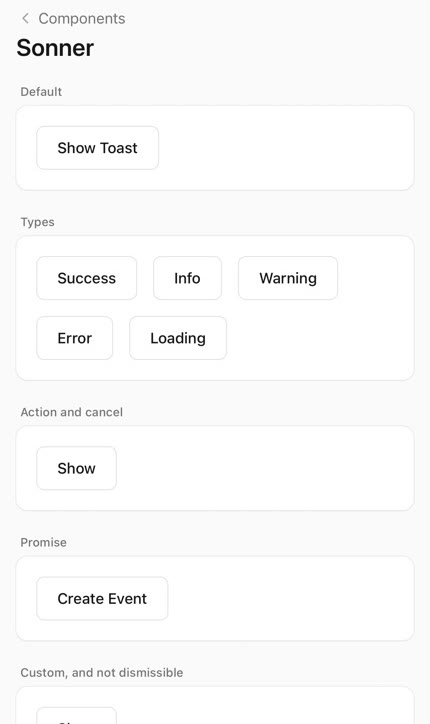
sonner-example.tsx
Sonner's Toaster and toast(), on the same engine as Toast.
Installation
Usage
import { Button } from "@/components/ui/button"
import { toast, Toaster } from "@/components/ui/sonner"
import { Text } from "@/components/ui/text"<Button
variant="outline"
onPress={() =>
toast("Event has been created", {
description: "Sunday, December 3 at 9:00 AM",
})
}
>
Show Toast
</Button>Composition
ExternalToastToasterToasterProps
Examples
import * as React from "react"
import { Button } from "@/components/ui/button"
import { toast, Toaster } from "@/components/ui/sonner"
import { Text } from "@/components/ui/text"
function SonnerExample() {
return (
<ExampleWrapper>
<Toaster closeButton />
<Example title="Default">
<Button
variant="outline"
onPress={() =>
toast("Event has been created", {
description: "Sunday, December 3 at 9:00 AM",
})
}
>
Show Toast
</Button>
</Example>
<Example title="Types" className="flex-row flex-wrap">
<Button
variant="outline"
onPress={() => toast.success("Event has been created")}
>
Success
</Button>
<Button
variant="outline"
onPress={() => toast.info("Arrive 10 minutes before the event")}
>
Info
</Button>
<Button
variant="outline"
onPress={() => toast.warning("The event cannot start before 8:00 AM")}
>
Warning
</Button>
<Button
variant="outline"
onPress={() => toast.error("The event could not be created")}
>
Error
</Button>
<Button
variant="outline"
onPress={() => {
const id = toast.loading("Creating event…")
setTimeout(() => toast.dismiss(id), 2000)
}}
>
Loading
</Button>
</Example>
<Example title="Action and cancel">
<Button
variant="outline"
onPress={() =>
toast("Event has been created", {
action: { label: "Undo", onPress: () => toast("Undone") },
cancel: { label: "Keep", onPress: () => {} },
duration: Infinity,
})
}
>
Show
</Button>
</Example>
<Example title="Promise">
<Button
variant="outline"
onPress={() =>
toast.promise(
new Promise<{ name: string }>((resolve) => {
setTimeout(() => resolve({ name: "Event" }), 2000)
}),
{
loading: "Creating event…",
success: (data) => `${data.name} created`,
error: "Could not create event",
}
)
}
>
Create Event
</Button>
</Example>
<Example title="Custom, and not dismissible">
<Button
variant="outline"
onPress={() =>
toast.custom(
(id) => (
<Button variant="ghost" onPress={() => toast.dismiss(id)}>
<Text>Press to dismiss</Text>
</Button>
),
{ dismissible: false, duration: Infinity }
)
}
>
Show
</Button>
</Example>
</ExampleWrapper>
)
}
export { SonnerExample }Differences from web
New engine. Sonner is DOM-only. It shares one engine with toast, keeping its API. position is accepted and unused: toasts stay at the top. A dialog opened later covers them.
Accessibility
Text is read as it appears. Give a control with no text an accessibilityLabel.