Skip to content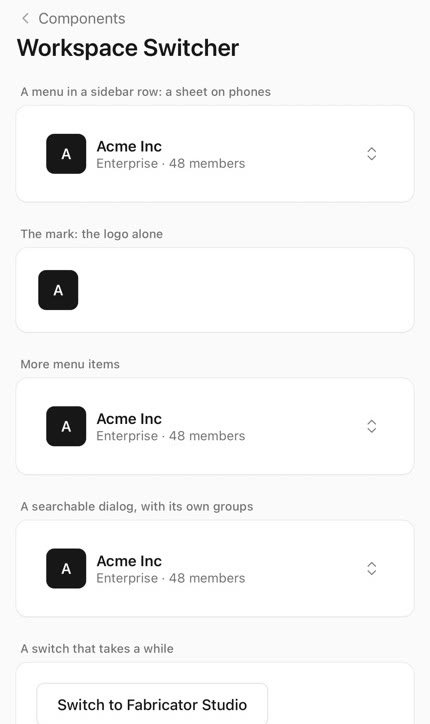
workspace-switcher-example.tsx
Switches the organization or workspace an app shows. A menu for a few, a searchable dialog for many.
Installation
Usage
import { Button } from "@/components/ui/button"
import { CommandGroup, CommandItem } from "@/components/ui/command"
import {
DropdownMenuGroup,
DropdownMenuItem,
DropdownMenuSeparator,
} from "@/components/ui/dropdown-menu"
import { SidebarProvider } from "@/components/ui/sidebar"
import { WorkspaceSwitcher } from "@/components/ui/workspace-switcher"<SidebarProvider className="w-full flex-none flex-col">
<View className="w-full">
<WorkspaceSwitcher
workspaces={WORKSPACES}
activeId={active}
onSelect={select}
switchingTo={switchingTo}
onCreate={() => {}}
onManage={() => {}}
variant="menu"
size="row"
shortcut={null}
/>
</View>
</SidebarProvider>Composition
WorkspaceWorkspaceSwitcher
Examples
import * as React from "react"
import { BuildingIcon, MailIcon } from "@fabricator-ui/icons-react-native"
import { View } from "react-native"
import { Button } from "@/components/ui/button"
import { CommandGroup, CommandItem } from "@/components/ui/command"
import {
DropdownMenuGroup,
DropdownMenuItem,
DropdownMenuSeparator,
} from "@/components/ui/dropdown-menu"
import { SidebarProvider } from "@/components/ui/sidebar"
import { WorkspaceSwitcher } from "@/components/ui/workspace-switcher"
const WORKSPACES = [
{ id: "acme", name: "Acme Inc", description: "Enterprise · 48 members" },
{ id: "studio", name: "Fabricator Studio", description: "Pro · 6 members" },
{ id: "lab", name: "Side Lab", description: "Free · just you" },
{
id: "north",
name: "North Agency",
description: "Pro · 12 members",
logo: <BuildingIcon />,
},
]
function WorkspaceSwitcherExample() {
const [active, setActive] = React.useState("acme")
const [switchingTo, setSwitchingTo] = React.useState<string | null>(null)
// Apps load the next workspace here; the overlay covers the wait.
const select = (id: string) => {
setSwitchingTo(id)
setTimeout(() => {
setActive(id)
setSwitchingTo(null)
}, 900)
}
return (
<ExampleWrapper>
<Example title="A menu in a sidebar row: a sheet on phones">
<SidebarProvider className="w-full flex-none flex-col">
<View className="w-full">
<WorkspaceSwitcher
workspaces={WORKSPACES}
activeId={active}
onSelect={select}
switchingTo={switchingTo}
onCreate={() => {}}
onManage={() => {}}
variant="menu"
size="row"
shortcut={null}
/>
</View>
</SidebarProvider>
</Example>
<Example title="The mark: the logo alone">
<SidebarProvider className="flex-none flex-col">
<WorkspaceSwitcher
workspaces={WORKSPACES}
activeId={active}
onSelect={setActive}
size="mark"
label="Organizations"
createLabel="New organization"
manageLabel="All organizations"
onCreate={() => {}}
onManage={() => {}}
/>
</SidebarProvider>
</Example>
<Example title="More menu items">
<SidebarProvider className="w-full flex-none flex-col">
<View className="w-full">
<WorkspaceSwitcher
workspaces={WORKSPACES}
activeId={active}
onSelect={setActive}
>
<DropdownMenuSeparator />
<DropdownMenuGroup>
<DropdownMenuItem>
<MailIcon />
Pending invitations
</DropdownMenuItem>
</DropdownMenuGroup>
</WorkspaceSwitcher>
</View>
</SidebarProvider>
</Example>
<Example title="A searchable dialog, with its own groups">
<SidebarProvider className="w-full flex-none flex-col">
<View className="w-full">
<WorkspaceSwitcher
workspaces={WORKSPACES}
activeId={active}
onSelect={setActive}
variant="command"
onCreate={() => {}}
onManage={() => {}}
>
<CommandGroup heading="Invitations">
<CommandItem value="invite-north">
<MailIcon />
North Agency
</CommandItem>
</CommandGroup>
</WorkspaceSwitcher>
</View>
</SidebarProvider>
</Example>
<Example title="A switch that takes a while">
<Button variant="outline" onPress={() => select("studio")}>
Switch to Fabricator Studio
</Button>
</Example>
</ExampleWrapper>
)
}
export { WorkspaceSwitcherExample }API reference
Props it adds to what it wraps: activeId, createLabel, label, manageLabel, onCreate, onManage, onSelect, shortcut, size, switchingTo, variant, workspaces.
Differences from web
Same. Opens as a sheet on phones. The search dialog has no key hints.
Accessibility
Parts set role="button", role="status", read by VoiceOver and TalkBack. Give a control with no text an accessibilityLabel.